
Solution by challenge
Put a carbon figure on every PC.
Sustainability reports need a number for IT. Acquaintia estimates the electricity each PC uses and converts it with the carbon factor you report with, for any site or the whole organisation.
-
Desk PC: asleep from 00:00 to 08:50, woken by Acquaintia from 08:50 to 09:00, in use from 09:00 to 12:30, on, nobody using it from 12:30 to 13:15, in use from 13:15 to 17:00, on, nobody using it from 17:00 to 17:30, asleep from 17:30 to 24:00.
-
Meeting room PC: asleep from 00:00 to 08:50, woken by Acquaintia from 08:50 to 09:00, on, nobody using it from 09:00 to 10:00, in use from 10:00 to 11:30, on, nobody using it from 11:30 to 12:00, asleep from 12:00 to 14:00, in use from 14:00 to 15:30, on, nobody using it from 15:30 to 16:00, asleep from 16:00 to 24:00.
-
Laptop shut down at night: off from 00:00 to 08:30, in use from 08:30 to 17:30, off from 17:30 to 24:00.
The problem
The electricity bill covers the building, not each PC.
-
IT’s share is a guess
The bill shows what a site used, not what its PCs used, or which of them were on for nobody.
-
Factors change every year
Grid carbon factors are updated annually, and different suppliers and tariffs can carry different ones.
-
Showing progress needs a before
A reduction only counts against a period you can point to.
What does the work
The parts of Acquaintia that take this on.
How it is done
An estimate you can explain, line by line.
-
A profile for every PC
The agent reports each PC’s hardware, and Acquaintia picks a wattage profile by make and model, system type and monitor.
-
Time in each power state
The agent records how long each PC spends active, idle, asleep and off.
-
Your factor on every tariff
Each tariff carries the carbon factor you report with, and sites inherit their tariff.
-
Report against a baseline
Energy and CO2e for the sites and period you choose, against a baseline, exported as CSV for your carbon report.
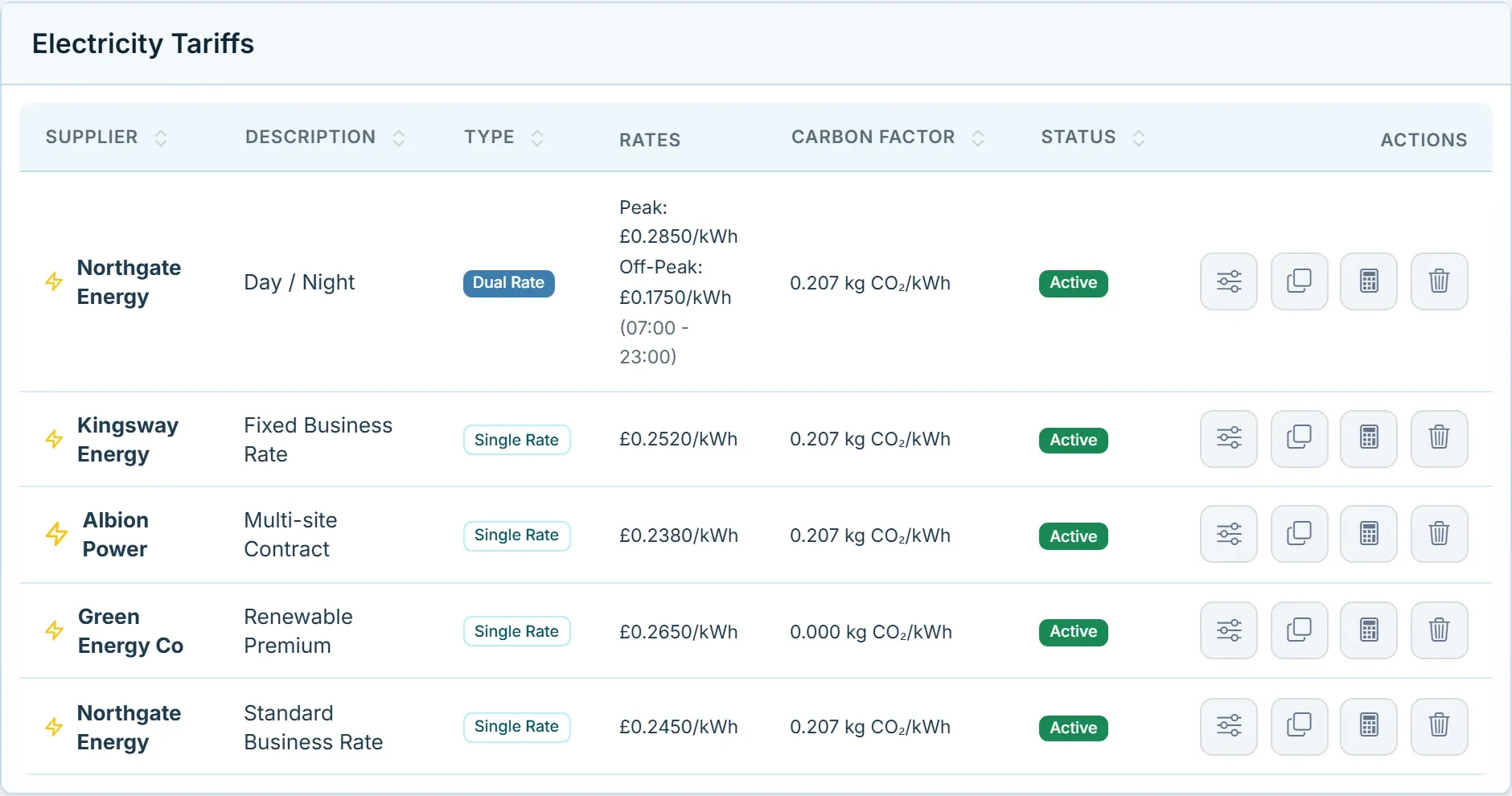
A carbon factor on every tariff.
Set the factor each supplier’s electricity carries, and update it when the published factors change.
Questions
Are the figures measured?
No, they are estimates, from each PC’s wattage profile and the time it spends in each power state. That makes them consistent across every PC and site, and easy to explain.
Which carbon factor should we use?
The one your organisation reports with. UK organisations often use the government greenhouse gas conversion factor for grid electricity, which is updated every year.
Give your carbon report an IT line.
Book a demo and we’ll show you the reports, set up with tariffs and a carbon factor like yours.
Other challenges
- Cut out-of-hours energy waste Stop powering PCs nobody is using at night and at weekends.
- Patch overnight, then sleep Wake PCs for updates, then let them sleep again.
- Manage power across every site Each site its own hours, tariff and policy, in one console.
- Acquaintia PC power management for Windows fleets: sleep, wake and the energy behind it.
- Healthcare Round-the-clock areas, shared workstations and offices that keep office hours.
- Education Shared PCs in labs, libraries and teaching rooms, empty for long stretches.