
Solution by challenge
Every site its own hours and tariff. One console.
Different buildings keep different hours and pay different rates. Acquaintia organises your sites as a tree, so each one gets the right policy and tariff, and you can report site by site.
-
Head office: asleep from 00:00 to 07:50, woken by Acquaintia from 07:50 to 08:00, in use from 08:00 to 18:00, on, nobody using it from 18:00 to 18:30, asleep from 18:30 to 24:00.
-
Branch: asleep from 00:00 to 08:50, woken by Acquaintia from 08:50 to 09:00, in use from 09:00 to 17:30, asleep from 17:30 to 24:00.
-
Contact centre: asleep from 00:00 to 06:50, woken by Acquaintia from 06:50 to 07:00, in use from 07:00 to 22:00, asleep from 22:00 to 24:00.
-
Depot: asleep from 00:00 to 05:50, woken by Acquaintia from 05:50 to 06:00, in use from 06:00 to 14:00, asleep from 14:00 to 24:00.
The problem
One policy doesn’t fit every building.
-
Hours differ
Offices, shared spaces and round-the-clock teams keep different hours, even within one organisation.
-
Rates differ
Each site has its own supplier and tariff, so the same hour costs different amounts in different places.
-
Sorting PCs by hand doesn’t last
PCs move, arrive and leave faster than anyone can file them.
What does the work
The parts of Acquaintia that take this on.
How it is done
Model your sites once. New PCs follow.
-
Build the tree
Regions, sites, buildings and floors, nested as deep as you need.
-
Sync your directory
Computers, users, groups and OUs from Active Directory, over LDAP.
-
Let rules place PCs
Rules match on criteria such as IP range, OU, directory group and hardware model, in the priority order you set.
-
Give each site its hours and tariff
Policies for groups that rules fill by location, and tariffs that every floor below a site inherits.
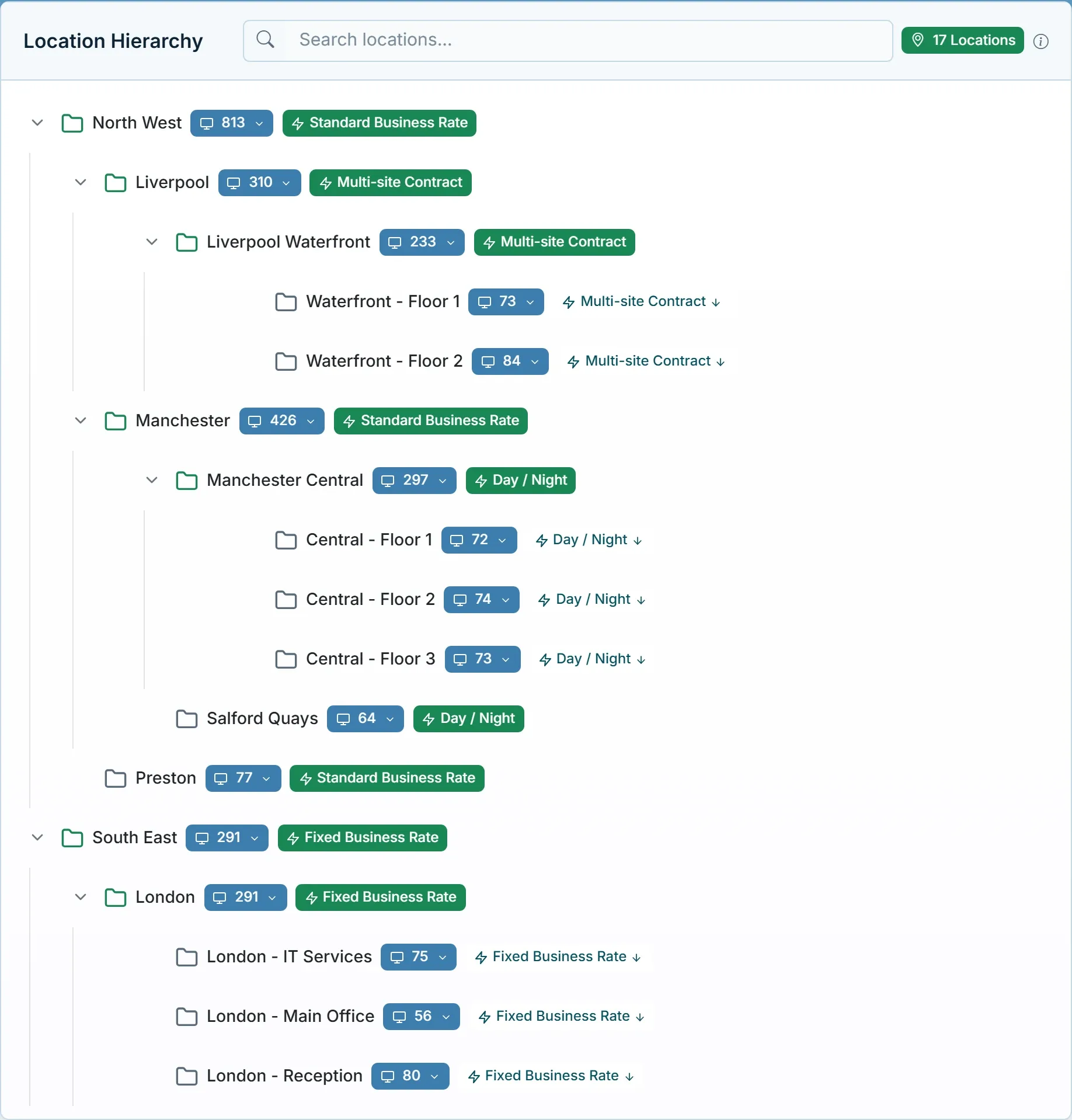
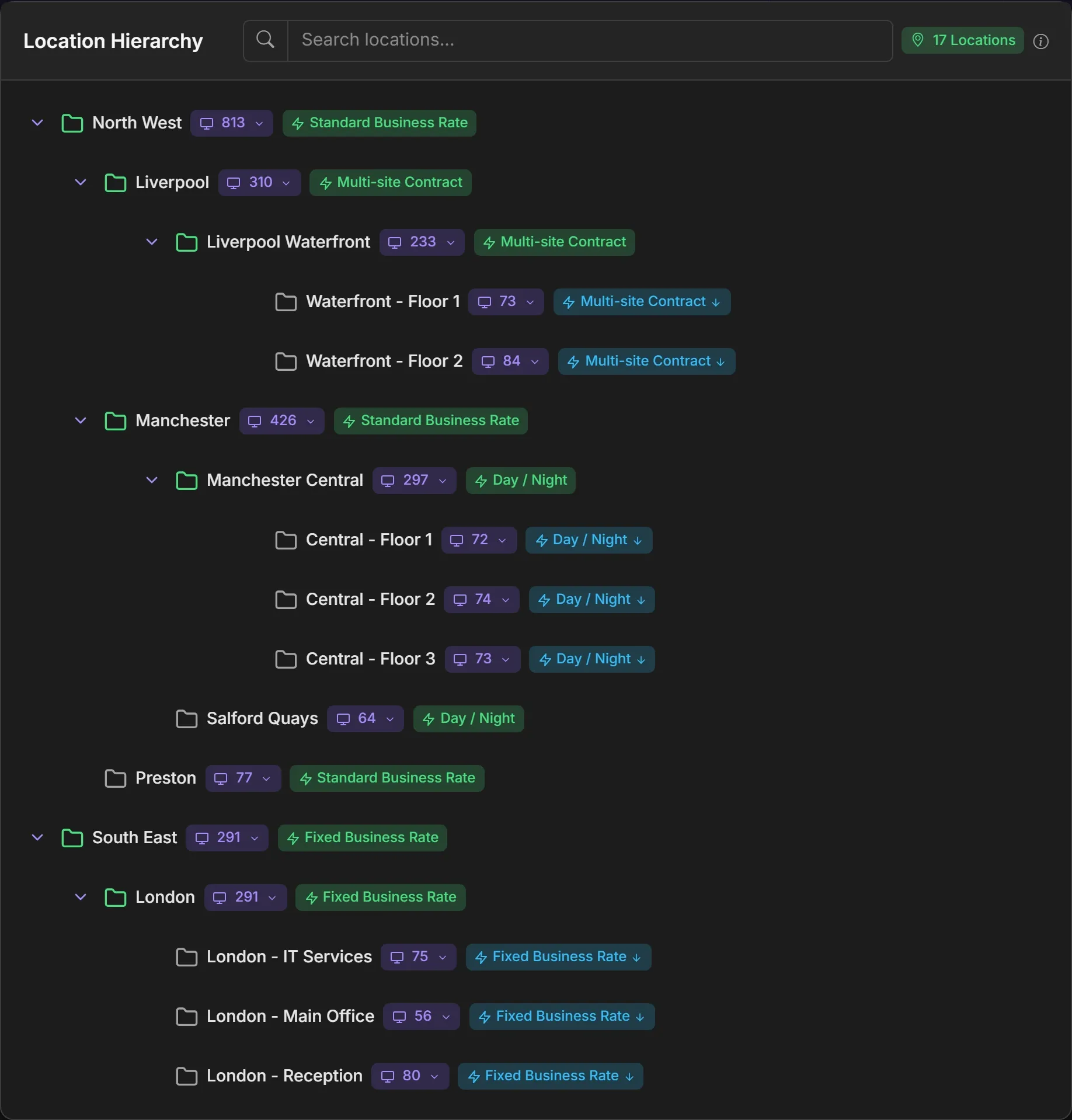
Your organisation, as a tree.
Each level carries its computer count and its tariff, and everything below inherits the tariff unless it sets its own.
Questions
Can each site keep its own hours?
Yes. Create a policy for each set of hours and assign it to the locations or groups that keep them.
Do new PCs need sorting by hand?
No. Location and group rules place each PC by criteria such as IP range, OU, directory group and model, so new PCs land where they belong.
See every site in one place.
Book a demo and we’ll show you locations, directory sync and rules working together, set up like your organisation.
Other challenges
- Cut out-of-hours energy waste Stop powering PCs nobody is using at night and at weekends.
- Report PC carbon for net zero Estimated Scope 2 emissions for every PC and site.
- Patch overnight, then sleep Wake PCs for updates, then let them sleep again.
- Acquaintia PC power management for Windows fleets: sleep, wake and the energy behind it.
- Healthcare Round-the-clock areas, shared workstations and offices that keep office hours.
- Education Shared PCs in labs, libraries and teaching rooms, empty for long stretches.